How to Create a Telegram Bot in 30 Minutes
A Telegram bot is a small program that talks to people through the Telegram app, and creating one is free and takes about half an hour. You do not need a company, an API key from anyone but Telegram, or even a server to get started. This guide walks from zero to a working bot and then to the part most tutorials skip: hosting it, keeping it secure and getting people to find it.
- Every bot starts in a chat with @BotFather, which gives you a secret token.
- Your code receives messages from Telegram (long polling or webhook) and replies through the Bot API.
- Never publish your token. If it leaks, revoke it in BotFather straight away.
- Once it works, list it in a directory so real users can discover it.
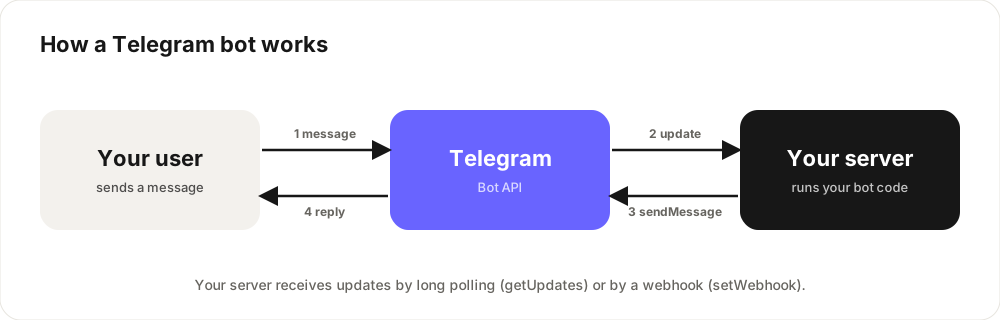
How a Telegram bot works
When someone messages your bot, Telegram turns that message into an update. Your server gets the update, decides what to do, and sends a reply through the Bot API. That is the whole model. The only choice you make is how updates reach your code: long polling (your code repeatedly asks Telegram for new updates, simplest while developing) or a webhook (Telegram sends updates to an HTTPS URL on your server, better for production and serverless hosting).
Step 1: Create the bot with BotFather
- Open Telegram and search for @BotFather, the official bot for creating bots. Check for the verified badge.
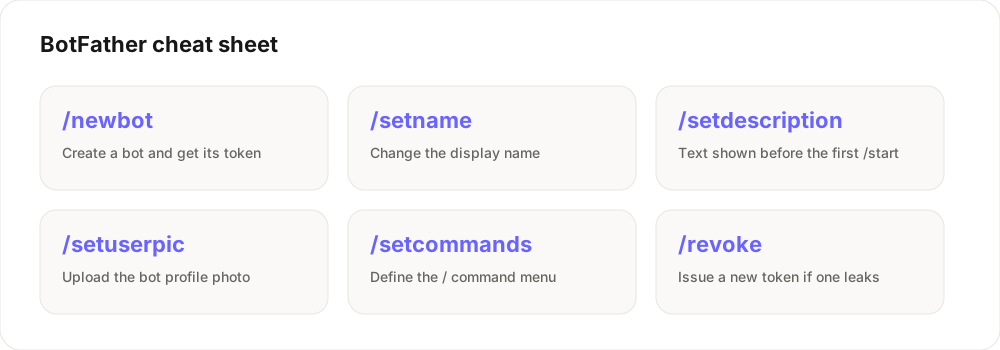
- Send
/newbot. - Choose a display name, for example "Daily Quotes".
- Choose a username. It must be unique and end in
bot, for exampledailyquotes_bot. - BotFather replies with an API token. Copy it somewhere safe. Anyone with this token controls your bot.
Step 2: Choose how to build it
You have two realistic paths:
- No-code builders let you drag together menus and replies. They are fast for simple FAQ, lead-capture or menu bots but limit custom logic.
- Code gives full control. Popular libraries are python-telegram-bot and aiogram for Python, and grammY and Telegraf for Node.js. If you can write a basic script, start here.
Here is a complete "hello world" bot in Node.js with grammY:
import { Bot } from "grammy";

const bot = new Bot(process.env.BOT_TOKEN);

bot.command("start", (ctx) => ctx.reply("Hi! I'm alive."));
bot.on("message:text", (ctx) => ctx.reply("You said: " + ctx.message.text));

bot.start();
And the same idea in Python with python-telegram-bot:
import os
from telegram import Update
from telegram.ext import ApplicationBuilder, CommandHandler, ContextTypes

async def start(update: Update, context: ContextTypes.DEFAULT_TYPE):
    await update.message.reply_text("Hi! I'm alive.")

app = ApplicationBuilder().token(os.environ["BOT_TOKEN"]).build()
app.add_handler(CommandHandler("start", start))
app.run_polling()
Store your token in an environment variable, as shown, instead of writing it into the file.
Step 3: Run it and test
Start the script, open your bot in Telegram, press Start and send a message. If it replies, you have a working bot. While you develop, long polling is fine because it runs from your laptop with no public URL needed.
Step 4: Host it so it stays online
A bot only answers while its code is running. Your main options:
- A small always-on service on a platform like Render or Railway, or a cheap VPS, running long polling or a webhook.
- Serverless functions (for example on Vercel) with a webhook. You register the URL once with
setWebhookand Telegram calls it for every update. Cold starts mean slower first replies, so keep handlers fast.
Webhooks must use HTTPS. Whichever host you choose, set the bot token as a secret environment variable there too.
Step 5: Polish the bot's profile
This is where users decide whether to press Start, so spend ten minutes on it. In BotFather use /setdescription for the text people see before they start, /setuserpic for a clear profile photo, and /setcommands to create the command menu. Write the description as a one-line promise: what the bot does and for whom.
Security basics
- Never commit the token to GitHub. Public repositories are scanned for leaked tokens constantly.
- If the token leaks, send
/revoketo BotFather and update your hosting secret. - Validate and limit user input, especially if the bot calls paid APIs, so one user cannot run up your bill.
- Be honest about data. Say what you store and why, and follow Telegram's Bot Platform terms.
Step 6: Get your first users
A working bot nobody can find earns nothing. Submit it to a directory so it has a permanent public page, then share it where your audience already is. On Kiver, you paste your t.me link, pick a category and your bot gets a listing people can search, upvote and share. Launch your bot on Kiver, then read how to get your first 100 users and how bots can earn money.
Frequently asked questions
Is it free to create a Telegram bot?
Yes. Creating a bot with BotFather is free. You only pay if you choose a paid hosting plan or use paid third-party APIs.
Do I need to know how to code to make a Telegram bot?
No. No-code builders cover simple menu and FAQ bots. For custom logic, payments or integrations, basic coding in Python or JavaScript helps a lot.
What is the difference between polling and webhooks?
With long polling your code keeps asking Telegram for new updates. With a webhook Telegram sends each update to your HTTPS URL. Polling is easier for development; webhooks suit production and serverless hosting.
Why must a bot username end in 'bot'?
It is a Telegram rule that makes bots easy to recognise. Pick a short, memorable name that describes what the bot does.
How do I get people to use my bot?
List it in a directory such as Kiver, share it in relevant communities, give it a clear description and a great first message, and use deep links to see which channels bring users.