How I Make $250 to $500 a Month on Telegram With an AI Screenshot Bot
Most people picture trading as a screen full of charts, a trading account and a lot of stress. Mine is a chat window. I send a chart screenshot to PipTrader AI, an AI bot on Telegram, and it reads the structures on the chart and sends back a signal. I have used it for two months, and that simple routine brings in roughly $250 to $500 a month for me. In this guide I will show you how it works and how you can set up something similar.
- A screenshot signal bot needs no API keys, no passwords and no access to your exchange account.
- You send a chart, the bot spots specific structures, and you get a signal in seconds.
- PipTrader AI covers all the major forex pairs and gold, and it learns from backtesting and live market screenshot results.
- You make every trade decision yourself.
- I earn roughly $250 to $500 a month with this setup: a steady side income, not overnight riches.
What a screenshot analysis bot does
The idea is simple. You take a screenshot of a chart, send it to the bot on Telegram, and the bot analyzes it. It looks for particular structures it has been built to recognize, then replies with a signal.
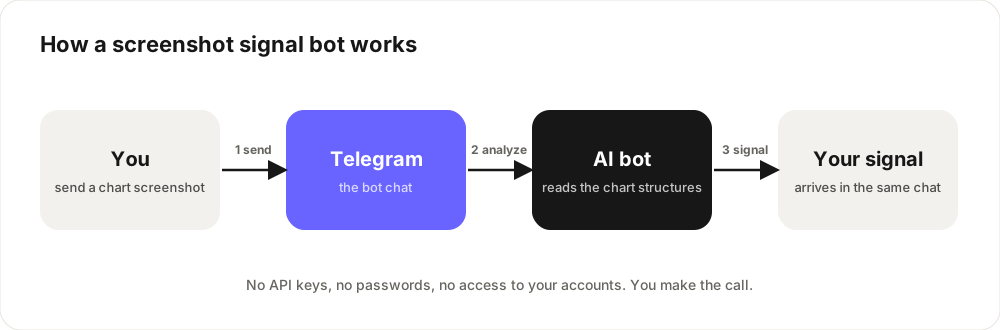
- Send a clear screenshot of the chart you are watching.
- Wait a few seconds while the bot analyzes the structures on it.
- Get your signal in the same chat, ready to use.
Meet PipTrader AI
The bot I use is PipTrader AI, and you can find it on Kiver. It covers all the major forex pairs and gold, so I can use the same routine whether I am watching EUR/USD or XAU/USD.
What I like most is that it keeps improving. PipTrader AI learns from two sources: backtesting on past market data, and the results of live market screenshots. The more charts it sees and the more outcomes it learns from, the more its analysis is refined over time.
Why I like this approach
It is private and safe. The bot never connects to your exchange or broker. It only sees the screenshot you send, so there are no keys to create and no passwords to share.
It is fast. Instead of staring at charts, I get a read in seconds, wherever I am. Telegram works on any phone, so there is nothing to install.
It is consistent. A bot looks for the same structures the same way every time. That takes some of the guesswork and emotion out of the decision.
You stay in control. The bot gives signals. You choose whether to act on one, how much to put in, and when to stop.
A simple routine you can follow
- Use clear screenshots. Include the full chart, and keep the timeframe the same so your signals are comparable.
- Check each signal against your own view. The bot is a second pair of eyes, not a replacement for your judgment.
- Start with small trade sizes while you learn how the signals behave.
- Keep a log. Write down each signal, what you did and what happened. After a month you will know exactly what works for you.
- Grow slowly. Add size only once your log shows results you are happy with.
What $250 to $500 a month really means
After two months of using it, it is a dependable extra income that I can run from my phone. It is not a get-rich-quick plan, and I do not treat it as one. Your own results will depend on how much you trade with, how disciplined you are and how the market behaves, so use my range as proof the approach can work, not as a promise.
Find AI bots on Telegram
New AI bots appear on Telegram every week. You can browse them in the AI bots category on Kiver, or explore the full directory. Choose bots with a clear description, a real logo and an identifiable developer, and try them with free or small tests first.
Turn your own method into a bot
If you have a method that works, you can package it as a Telegram bot and let other people use it. Our guides on how to create a Telegram bot and how to make money with Telegram Stars show you how to build one and charge for it. Once it is ready, list it on Kiver so people can find it. For more ways to earn, read our guide to making money on Telegram.
Not financial advice. Trading involves risk, my results are my own, and yours will vary.
Frequently asked questions
What does PipTrader AI trade?
PipTrader AI covers all the major forex pairs and gold. You send a screenshot of the chart you are watching and it replies with a signal.
Does PipTrader AI improve over time?
It learns from both backtesting and the results of live market screenshots, so its analysis keeps being refined as it sees more charts.
Do I need to give the bot my exchange login or API keys?
No. A screenshot bot only sees the image you send, so there are no keys or passwords involved.
Do I need trading experience?
It helps, but you do not need to be an expert. The bot does the first read of the chart, and you build your own judgment as you keep a log.
Can I use it on my phone?
Yes. Everything happens inside Telegram, so it works on any phone or computer where you use the app.
How much can I earn?
I make roughly $250 to $500 a month. Your results will depend on your capital, discipline and the market, so treat my range as an example and not a guarantee.